
How to Track Your Backlink Indexing Rate (Free Template)
Calculate and track your backlink indexing rate with a simple formula and a free spreadsheet that separates confirmed, unconfirmed and unchecked URLs.

You earned the link. The page is live, the anchor text is right, and the editor even sent a thank-you. Weeks later, the page that links to you still isn't in Google.
When SEOs talk about backlink indexing, they usually mean whether Google has indexed the page that contains the backlink. To diagnose a missing backlink page, first find out whether Google knows the URL, whether it could fetch the page, and whether it selected that URL for indexing.
Discovery is when Google learns a URL exists. Crawling is when Googlebot fetches it. During indexing, Google analyzes the page and may store it in its search index. Google's documentation on how Google Search works describes each of these stages. If Google finds several versions with similar content, it may select one canonical URL to represent them.
Google can discover a linking page by following links from pages it already knows, reading a sitemap, or following a redirect from another URL. A page with few crawlable links pointing to it and no sitemap entry may take longer to discover.
For example, Googlebot can find a fresh post by following an HTML link from a blog's category page. The site owner can also list the post in a sitemap so Google has another way to discover it.
Permanent redirects generally signal that the destination should be canonical. Temporary redirects can leave the original URL as the preferred version. If the URL a publisher gave you redirects, check the destination to confirm that your backlink is there. Use Search Console, if you have access, to see which URL Google selected as canonical.
Once Google knows about a URL, its systems decide whether and when to fetch it. Googlebot can slow down when a server struggles. A robots.txt rule can prevent crawling, and a login wall can keep Googlebot from accessing the article.
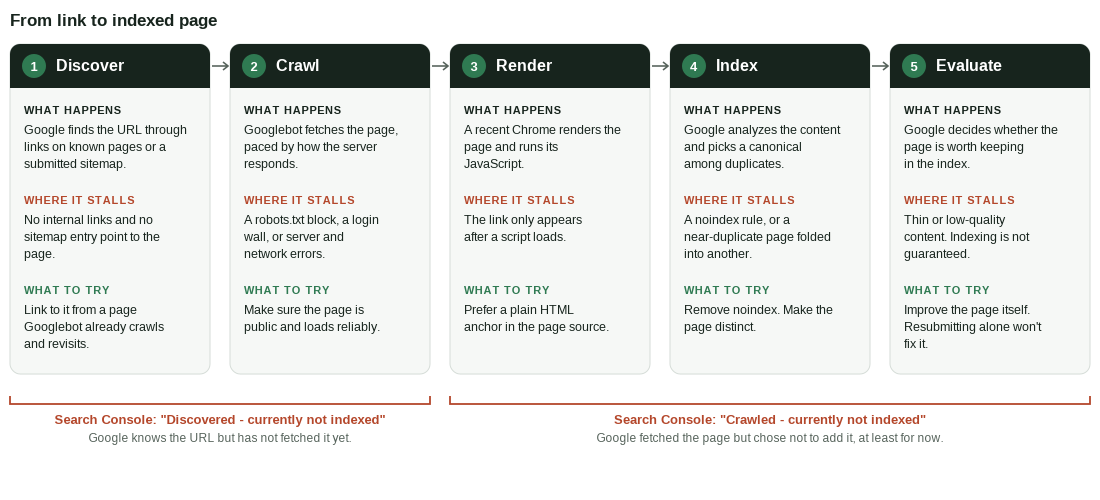
The diagram shows where a linking URL can stall: discovery, crawling, rendering, or indexing.
Rendering. Google can run JavaScript when it renders a page. If a comment widget inserts a link, check the rendered page for an anchor with an href attribute. A widget can display clickable text without producing a link Google can reliably extract.
Canonical selection. When Google finds several versions of substantially the same page, it may choose one URL as canonical, as explained in Google's guide to consolidating duplicate URLs. The URL you received from the publisher can therefore be absent from Google's index while another version appears.
Suppose a publisher republishes an article and adds a link to your site. If Google selects the original article as canonical, open the original and check whether your link appears there too. If the link appears only in the republished copy, ask the publisher to inspect that URL in Search Console and confirm the Google-selected canonical. That lets you verify which version Google selected and whether that version contains your link.
Indexing is worth tracking because a backlink on a page Google hasn't indexed is unlikely to be of any use to you. When a publisher gives you a placement URL, confirm that the backlink appears on the page you actually reach.
An index check only covers the source URL. It cannot show how much weight Google gives a backlink or whether the link changed your rankings.
Start with the linking page's URL. Google may have yet to discover it, may be unable to fetch it, or may have processed it and left it out of the index.
noindex directive tells Google to exclude the page from search.Our guide on why backlinks aren't getting indexed breaks down the common causes and gives you a test for each one.
If you have access to the site's Search Console property, inspect the exact URL. The report shows its indexing status and may show the last crawl date and the Google-selected canonical.
For a page you don't manage, ask the publisher to inspect the URL. You can also try a site: search or an index-checking tool, but a missing search result alone is inconclusive. Our walkthrough on how to check whether a backlink page is indexed covers the options for pages you don't control.
If the page is yours, confirm that it's public, returns a successful response, and has no noindex directive. Check that a relevant page links to it through a standard HTML anchor. If Google already crawled it, review what Google can render and whether another URL covers substantially the same content before requesting another crawl.
If the page belongs to a publisher, make a specific request based on what you found. For example, ask them to link to it from a relevant article or category page, confirm it's in their sitemap, or check for a stray noindex directive.
You can also submit the linking URL to a backlink indexer to support discovery, then check its status separately.
Google does not guarantee crawling, indexing, or appearance in search results, even for pages that follow its guidelines. A page can be indexed and still fail to appear for a particular query.
No. Google decides page by page, and it does not index every URL it finds. A linking page can be left out because of a crawl restriction, a noindex directive, canonical selection, or a quality decision.
Not necessarily. Indexing only confirms that Google stored the page. Whether the link passes any value to your site is a separate question that an index check can't answer.
Check the status in Search Console first.
For a site you don't manage, ask the publisher to run these checks.
When you audit a backlink, record the URL the publisher gave you, the final URL after any redirects, whether that page contains your link, and its indexing status. Those details show whether to investigate discovery, page access, or canonical selection.
Calculate and track your backlink indexing rate with a simple formula and a free spreadsheet that separates confirmed, unconfirmed and unchecked URLs.
Three ways to check whether a page linking to you is in Google's index, where each method fails, and how to record the results reliably
